Cold Email & Lead Generation
I Scraped 10,000 Email Addresses in 30 Seconds — Here's Exactly How
Watch Me Pull 10,000 Leads in Half a Minute
I want to show you something that honestly still surprises me every time I do it.
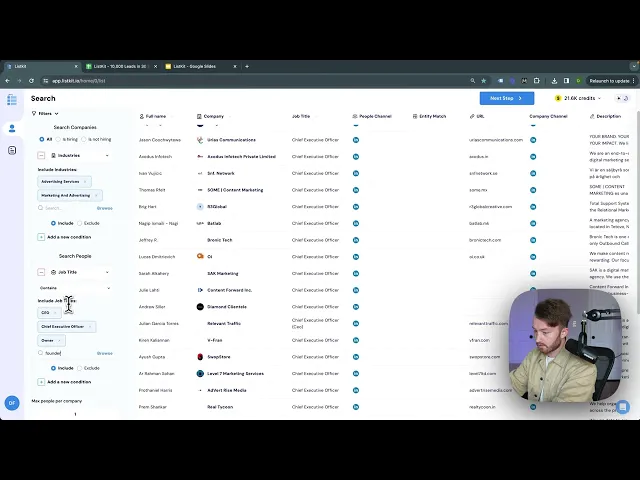
I opened our lead-generation platform, clicked Industries → Browse, selected Advertising, then filtered by job title: CEO, Owner, Founder, VP, President. Added one more condition — Country: United States. The search returned 9,957 people.
I set max people per company to one, hit next, redeemed 10,000 credits, and waited.
The output was done in about 30 seconds.
I clicked download, got the CSV, imported it, and had a full dataset of leads with every data field populated — including business emails, all marked verified.
That’s the whole process. No extra tools. No manual work. Just done.
Why Triple Verification Actually Matters
Every single lead on our lead-generation platform is triple verified. And here’s the part that matters: you only spend a credit when a lead passes all three verification rounds.
To understand why that’s significant, let me show you what the old process looked like.
Before tools like this existed, here’s what scraping leads actually looked like:
Select 50 leads manually, page by page
Send them to a Google Sheet
Upload to a paid email verification tool
Take the catchalls, upload to a second verifier
Bring everything back into a Google Sheet
Delete invalid emails
Delete duplicates
Finally upload to your sending tool
That process was a part-time job. our lead-generation platform does all of it automatically — three times over — and only charges you when a lead actually clears.
We’re processing roughly 1,000 leads every four to five minutes, and what you get at the end is a clean, giant output with zero manual work on your end.
What Happens If You Don’t Verify Your Leads
I want to be direct about this because I’ve seen it happen.
If you send cold email to unverified lists, you get your Google account suspended. Your domain burns. Your sales team can’t reach anyone. You make zero money.
Verification isn’t optional. It’s the difference between a functioning cold email operation and a dead one.
This is exactly why I care about the triple verification piece — it’s not a feature to gloss over in a bullet point. It’s the core reason the tool works.
The Filters That Make This Actually Useful
What I really like about our lead-generation platform is the specificity you can get with lead searches. You’re not stuck with broad categories.
You can filter by:
Industry — ecom brands, agencies, consulting, healthcare, legal, finance, real estate, software, manufacturing, education, and more
Company size
Technologies they’re using on their website
Keywords on their site
Location
Job title
That means you can build just about any combination of leads you can imagine. Ecom founders in the US running Klaviyo. Healthcare consultants at companies under 50 employees. Legal tech VPs on the East Coast.
If you can describe the prospect, you can probably find them.
Should You Try It?
our lead-generation platform comes with a 30-day money back guarantee, so there’s no real risk in finding out if it fits your workflow.
For a limited time, signing up also includes a 100,000 cold emails per month course — which, if you’re building or scaling a cold outreach system, is genuinely worth having alongside the tool.
Click the link in the description or the button below to try it out.
The Bottom Line
Scraping leads used to be slow, manual, and expensive when you factored in all the verification tools stacked on top of each other. our lead-generation platform collapses that entire process into one step.
10,000 verified leads. 30 seconds. One click to download.
If cold email is part of how you grow, that math is hard to ignore.